
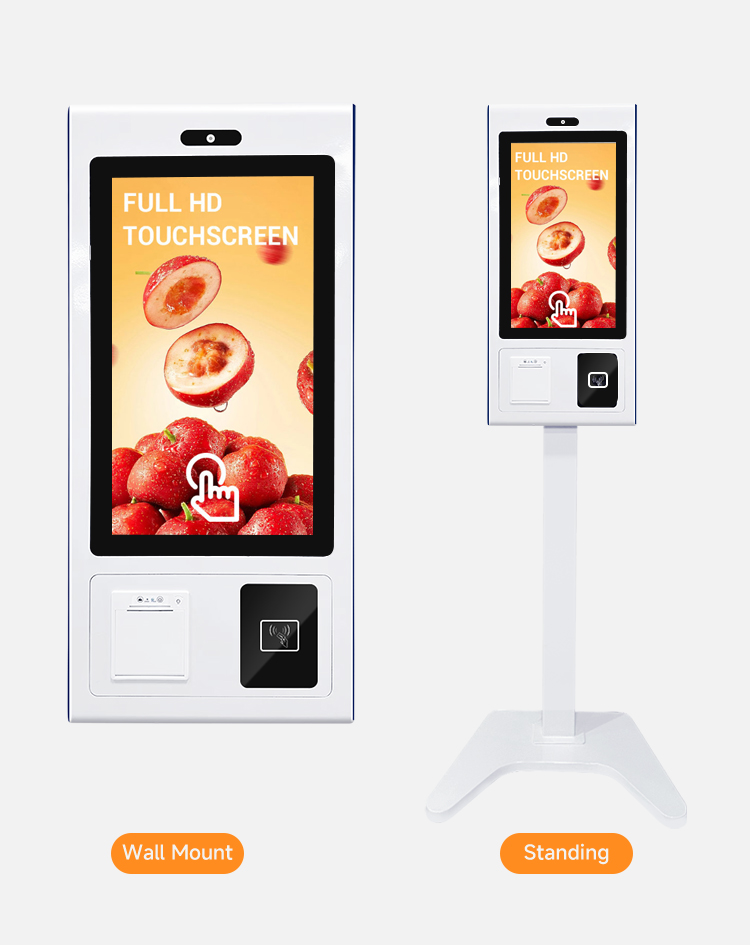

Transform your customer journey with the high-performance **Self-Service Payment Kiosk**. In an era where speed is currency, this 21.5-inch terminal empowers your customers to browse, order, and pay independently, significantly reducing queue times during peak hours.
Why Upgrade to a Self-Service Payment Kiosk?
Deploying a **Self-Service Payment Kiosk** is like adding a reliable, 24/7 employee to your team. It automates repetitive tasks, allowing your staff to focus on food quality and personalized service. Studies show that Self-checkout solutions often increase average ticket size by up to 20% due to visual upselling on the large screen.
🛠️ Industrial-Grade Hardware
Unlike consumer tablets, our **Self-Service Payment Kiosk** is built for heavy commercial use. The screen utilizes advanced Projected Capacitive (PCAP) technology, ensuring instant touch response even in humid environments.
- Crystal Clear Visuals: The 1080p Full HD panel ensures your menu images look mouth-watering and sharp.
- Universal Payment Support: The side bracket is adjustable to fit various EFTPOS terminals, supporting chip cards and NFC (Contactless) payments like Apple Pay.
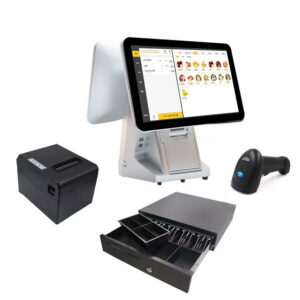
- Built-in Printing: Includes a high-speed 80mm Thermal Receipt Printer with an auto-cutter, hidden securely inside the chassis.
| Feature | Specification |
| Product Name | K-Series Self-Service Payment Kiosk |
| Screen Panel | 21.5″ Industrial IPS LCD (350 nits) |
| Operating System | Android 11 (RK3288/RK3399) or Windows 10 (i3/i5) |
| Scanner | Wide-angle 2D QR Code Reader |
| Network | Dual-Band WiFi + Ethernet (RJ45) + Bluetooth 4.0 |
| Installation | Standard VESA Wall Mount or Floor Stand |
Seamless Software Integration
Whether you run a fast-food chain or a boutique store, the **Self-Service Payment Kiosk** adapts to your ecosystem. The hardware supports standard HID protocols, making it compatible with major POS software platforms on both Android and Windows.
📋 Frequently Asked Questions (FAQ)
Q: Is the Self-Service Payment Kiosk difficult to install?
A: Not at all. The floor-standing version ships in two main modules and can be assembled in 10 minutes. The wall-mount version includes a standard VESA bracket.
Q: Can I customize the color?
A: Yes, for bulk orders, we offer OEM customization for the **Self-Service Payment Kiosk** body color and logo placement to match your brand identity.
Q: What happens if the internet goes down?
A: The device supports offline mode (software dependent) and will automatically reconnect via WiFi or LAN once the signal is restored.
🔧 Maintenance Tips
To ensure longevity, regularly clean the air vents on the back of the **Self-Service Payment Kiosk** to prevent dust buildup. Use only alcohol-free wipes for the touch screen to maintain the oleophobic coating.
Ready to modernize your business? Contact us today for a quote on the **Self-Service Payment Kiosk**.
Self-Service Payment Kiosk Hardware for Restaurant, Retail and Service Projects
This self-service payment kiosk is designed for B2B projects that need touchscreen kiosk hardware for ordering, checkout, ticketing or service workflows. It is suitable for restaurants, QSR chains, retail stores, service counters and system integrators building self-service solutions.
Recommended Applications
- Restaurant and quick-service ordering kiosks.
- Retail self-checkout and customer service terminals.
- Ticketing, queue and reception service projects.
- OEM or project-based kiosk hardware sourcing for integrators.
Hardware Details to Confirm
Before ordering, confirm screen size, operating system, printer requirement, scanner requirement, payment device mounting space, network connection, installation method and software compatibility. PENPOS supplies kiosk hardware, while ordering software and payment integration are usually handled by the buyer or system integrator.
For more hardware options, compare our kiosk category, POS terminals and receipt printers. For B2B project pricing, contact PENPOS.
FAQ for Self-Service Kiosk Buyers
Does PENPOS provide kiosk software?
PENPOS focuses on hardware supply. Software and payment integration are usually configured by the buyer, software provider or integrator.
Can the kiosk be used in restaurants?
Yes. It can be used for restaurant ordering projects when matched with suitable ordering software and payment setup.
Can I request a hardware configuration quote?
Yes. Send the required screen size, OS, printer, scanner and payment device requirements for quotation.

Reviews
There are no reviews yet.